
Last updated: 26 July 2026
We provide remote assistance with your Nutty About Hosting account if you are struggling to set up your email account or FTP account, for example, using the knowledgebase articles. We provide this service for our clients using Splashtop SOS which supports Windows, Mac, Android and iOS (mobile phone is view only).
99% of the time it works flawlessly but occasionally there are problems connecting as everyones set up can be different. Here are the common issues and work arounds.
Not Accepting The Operating System (Windows/Mac) Warnings

When you run the splashtop application, it will ask you for permissions, which you must accept, and then you will be shown this screen with a number. Please give this number to your Nutty About Hosting support technican.
Closing the App After Generating the Code
You must leave the splashtop app running after you have generated the code otherwise it just won't work!
Can't Find the Download
When visiting https://www.splashtop.com/sos-download the download will start automatically. This will be in your downloads folder.
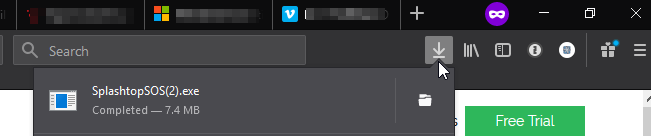
Firefox
You must 'Save' the file first

Downloads location.
Microsoft Edge
You can 'Run' the file straightaway in Edge
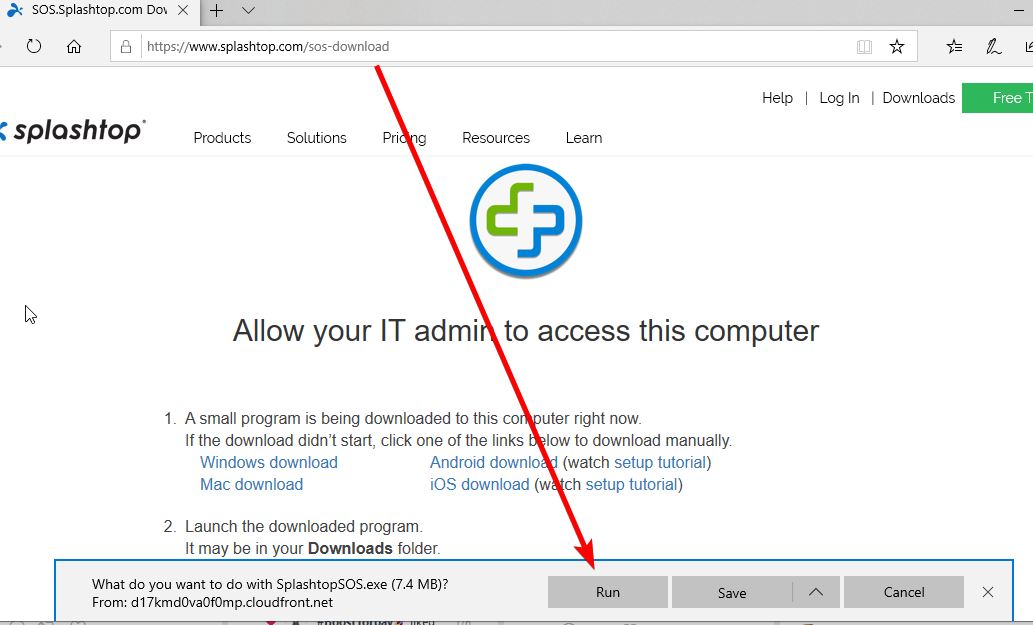
Or you can 'Save' the file and then 'Run' it or view in Downloads. Downloads location.

Chrome
Saves the file automatically. Click the file at the bottom of the page to run.

Downloads location.

Check Status
Visit https://www.splashtop.com/check to make sure you can connect.
Turn off Firewall
Your firewall or Anti virus software maybe blocking the connection.
Windows 10
Visit https://support.microsoft.com/en-gb/help/4028544/windows-10-turn-windows-defender-firewall-on-or-off for instructions on turning off the Windows Defender Firewall.
Mac
Visit https://support.apple.com/en-gb/HT201642 for instructions on turning off the Mac OSX Application Firewall.
We use a few cookies
Optional analytics cookies help us understand how visitors use the site so we can keep improving it. Essential cookies (like your basket) are always on. See our privacy policy.